
The wallet layer
Loyalty cards in Apple Wallet and Google Wallet, built for Indian businesses.
Your customer's phone already has a wallet. Brava puts your loyalty card inside it: Apple Wallet on iPhone, Google Wallet and Samsung Wallet on Android, installed in one tap from a QR code at your counter. The card lives on the lock screen, updates itself after every visit, and surfaces when the customer walks near your shop. No app to build, no API to integrate, no per-message cost.
What it is
A loyalty card that lives where the phone already looks.
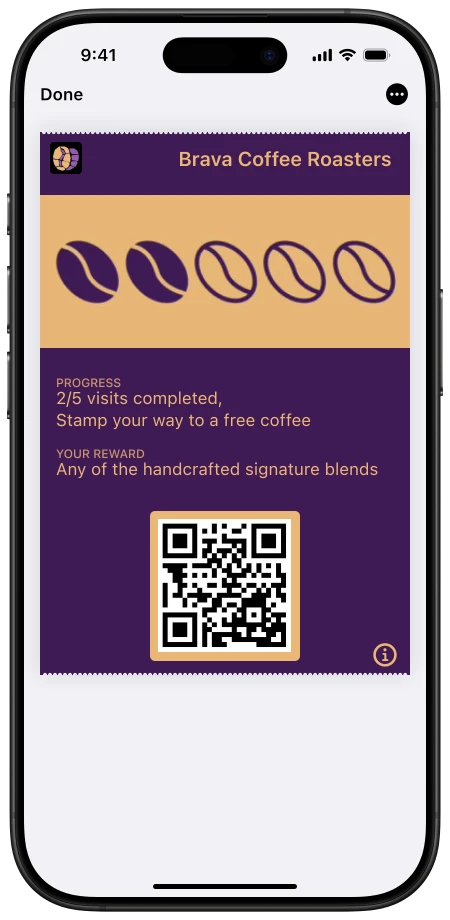
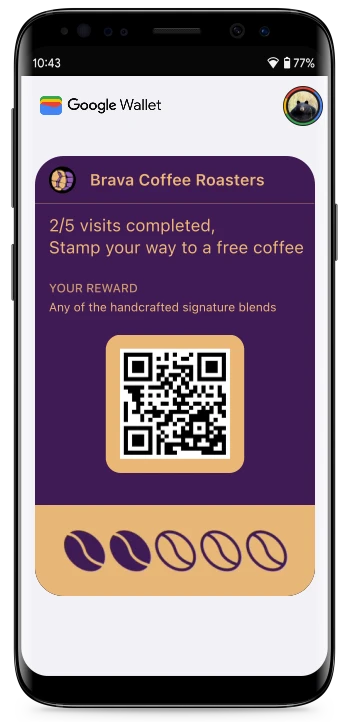
A wallet loyalty card is a digital pass issued into Apple Wallet, Google Wallet, or Samsung Wallet, the same place your customers keep boarding passes and payment cards. It carries your brand, your stamp grid or points balance, and a QR code your staff scan at the counter. Unlike a loyalty app, it requires no download and no signup. Unlike a WhatsApp message, it costs nothing to update and cannot be archived away. The pass updates itself after every visit and reappears on the lock screen at the moments that matter: when the stamps change, and when the customer is near your shop.
Enrollment
One tap at the counter. About fifteen seconds.
Customer scans your QR
On the counter sticker, the bill, or your Instagram bio. No phone-number ask, no form, no queue friction at peak hour.
Taps Add to Wallet
The phone offers its own wallet: Apple Wallet on iPhone, Google Wallet or Samsung Wallet on Android. The card installs with their first stamp already on it.
Every visit updates the same pass
Staff scan the pass QR, the stamp or points land instantly, and the lock screen carries the update the next time the phone wakes.
Presence, not broadcast
The lock screen does the marketing.
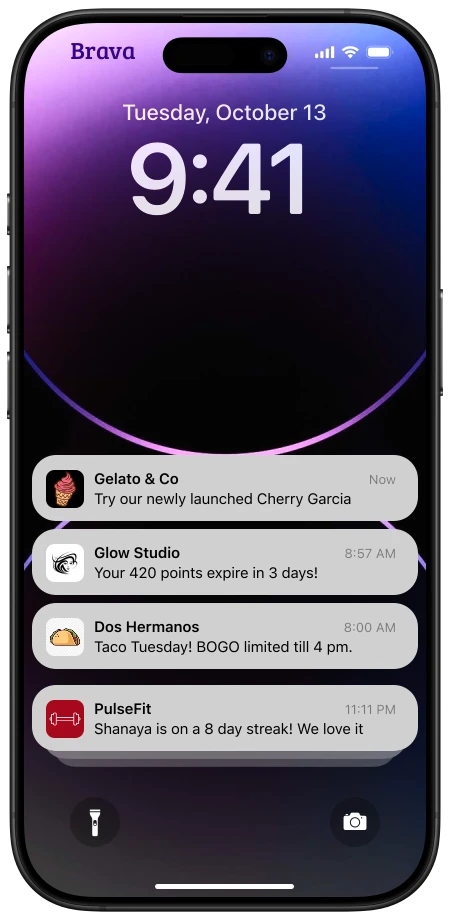
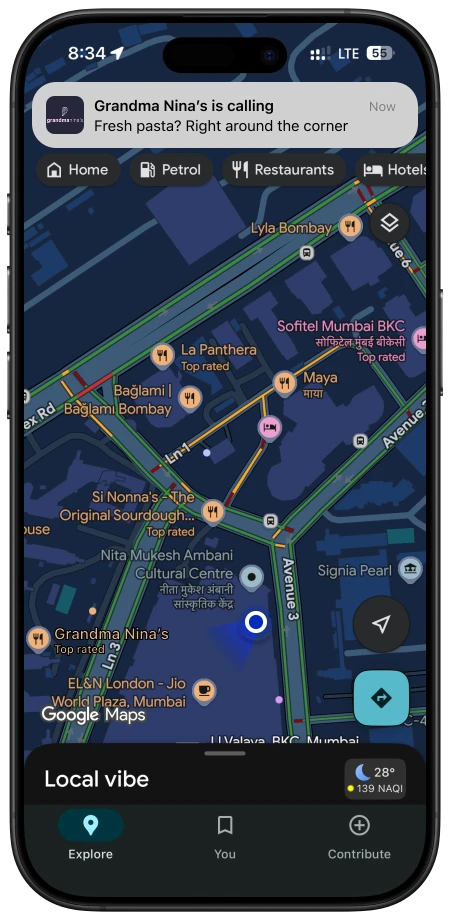
Two mechanics make the wallet pass a different channel from anything you can send. First, pass updates: when a stamp lands or a reward unlocks, the wallet OS itself carries the change to the lock screen, free, with no template and no send button. Second, location: Apple Wallet surfaces the pass as a silent lock-screen suggestion when the customer is within roughly 100 metres of a registered location, with up to 10 locations per pass, and Google Wallet shows a Nearby Passes notification near your saved locations. Brava lets you set a custom message per location per card, so the Bandra branch can say something different from Indiranagar.
Platform honesty
What each wallet actually supports.
The three wallets behave differently, and most loyalty vendors blur that. Here is the honest matrix, per Apple's PassKit and Google's Wallet API documentation as of June 2026. Brava issues to all three and works inside each platform's rules automatically.
| Capability | Apple Wallet | Google Wallet | Samsung Wallet |
|---|---|---|---|
| Ships preinstalled on | Apple WalletEvery iPhone | Google WalletMost Android phones sold in India | Samsung WalletSamsung Galaxy phones |
| One-tap install from QR or link | Apple WalletYes | Google WalletYes | Samsung WalletYes, via Add to Samsung Wallet |
| Lock-screen surfacing near your shop | Apple WalletSilent lock-screen suggestion within roughly 100m, up to 10 locations per pass | Google WalletNearby Passes notification near saved locations, up to 10 locations | Samsung WalletNot publicly documented |
| Notification when the pass updates | Apple WalletLock-screen change message, delivered by iOS | Google WalletPass message plus push, capped at 3 notifying messages per pass per 24 hours | Samsung WalletServer-side pass updates |
| Per-message cost to your business | Apple WalletZero | Google WalletZero | Samsung WalletZero |
| Customer app install required | Apple WalletNone | Google WalletNone | Samsung WalletNone |
The build-it-yourself reality
The wallet APIs are not a weekend project. One of them is not even open.
Issuing into Apple Wallet directly means an Apple Developer Program membership, pass type certificates, signing infrastructure, and a registered web service to push updates to passes in the field. Issuing into Google Wallet is harder for one structural reason: per Google's own Wallet console documentation, the Google Wallet API is currently not available to new businesses in India. A new Indian business cannot simply sign up and start issuing passes.
Brava already operates as an issuer across Apple Wallet, Google Wallet, and Samsung Wallet. Your loyalty program goes live in all three on day one, with the certificates, signing, update delivery, and platform rules handled for you. Most businesses launch the same day they design their first card.
The channel argument
Why the wallet beats an app and a WhatsApp list.
A branded loyalty app dies at the install step: nobody downloads an app for a café. A WhatsApp loyalty list costs money per message and lands in the inbox customers archive. The wallet pass needs no install beyond one tap, costs nothing per update, and occupies the one surface the customer looks at dozens of times a day. We have onboarded brands whose WhatsApp-CRM loyalty database held six to seven thousand customers with lifetime redemptions under ten. The full behavioral argument is on how we think about loyalty.
Platform changes
What iOS 27 changes about wallet passes.
Apple's iOS 27 adds a new pass style called Poster Generic and lets a loyalty card carry up to two tappable buttons on its face. Existing Apple passes are not converted automatically, but Google's Android Wallet redesign is applied automatically, so the two platforms need different handling. We keep a current merchant guide to all of it on Apple Wallet in iOS 27.
By business type
The right card format for your counter.
The wallet is the surface; the card format is the strategy. Stamp cards fit high-frequency, low-ticket visits. Memberships fit relationships. Prepaid passes fit play-time economics. Pick your vertical:
Common questions
Wallet loyalty cards, answered.
Do my customers need to download an app?
No. Apple Wallet ships on every iPhone, Google Wallet is preinstalled on most Android phones sold in India, and Samsung Wallet ships on Galaxy phones. The loyalty card installs into the wallet the phone already has, in one tap from a QR code or link. There is no app store visit, no signup form, and no phone-number capture at the counter.
Does this work for Android customers?
Yes, and that matters in India, where most of your customers carry Android. Brava issues the same loyalty card to Google Wallet and Samsung Wallet for Android customers and to Apple Wallet for iPhone customers. One QR code at the counter serves all three; the phone picks its own wallet.
What does it cost to send updates or notifications?
Nothing per message. The wallet OS delivers pass updates and location alerts itself, so there is no per-send fee, unlike WhatsApp Business API messaging which is billed per message. Platform limits still apply: Google Wallet caps push-notifying messages at 3 per pass per 24 hours, and Apple lock-screen location suggestions are silent by design. Brava works inside those rules automatically.
Can my business integrate the Apple and Google wallet APIs directly?
Technically Apple allows it: you would need an Apple Developer Program membership, pass type certificates, pass signing infrastructure, and a web service to push updates. Google is stricter: per Google's own Wallet console documentation, the Google Wallet API is currently not available to new businesses in India. Brava already operates as an issuer on these platforms, so your program goes live in all three wallets without your business touching any of the APIs.
How do customers get the card?
They scan a QR code at the counter, on the bill, or in your Instagram bio, and tap Add to Wallet. The card lands in their wallet in about fifteen seconds with their stamps or points already live. From then on, every visit updates the same pass on their lock screen.
See your card in your own wallet
15 minutes. We will issue a real Brava pass to your phone, in whichever wallet it carries, and price your business.